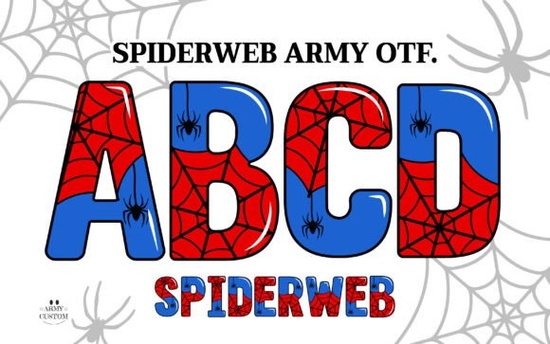
If you’ve been searching for a font that adds texture, depth, and just the right amount of eerie charm to your Halloween projects or even year-round designs with an edge the Spiderweb Army Font might be exactly what you’re missing. It’s not your average typeface. This one comes in two distinct flavors: a full-color OpenType SVG version that brings layered web-like details to life, and a simplified black version optimized for cutting machines like Cricut Design Space. Whether you’re making spooky party invites, merch for a niche audience, or printable wall art with personality, this font adapts without losing its character.
What makes this font different from others I’ve tried?
Most decorative fonts rely on outlines or flat fills. The Spiderweb Army Font, especially in its color version, uses actual layered textures that mimic real spiderwebs thin threads, overlapping strands, subtle gradients. That means when you drop it into Adobe Photoshop CC 2017+ or Illustrator CC 2018+, it renders as a rich, dimensional graphic rather than a flat shape. It’s the kind of detail that turns a basic quote tee into something people pause to look at twice.
And if you’re working with tools that don’t support color fonts (like Canva, older versions of Silhouette Studio, or mobile apps), you’re not stuck. The download includes bonus PNG files ready-to-use graphics of each letter and symbol. Just drag, drop, and layer them like any other image. No plugins, no conversions.
Will this work with my cutting machine?
Yes if you use the black version. The color OTF file won’t play nice with Cricut Design Space or similar platforms, but the included single-color variant is built specifically for those workflows. Upload it like any other TTF or OTF, weld your text, and cut away. Perfect for vinyl decals, iron-ons, stencils, or cardstock crafts. You get the same unique webbed letterforms without the compatibility headaches.
For those who bounce between digital design and physical crafting, having both versions in one pack is a quiet win. You can mock up a full-color poster in Photoshop, then switch to the black version to cut matching stickers or tote bags. Consistency across mediums matters when you’re building a brand or running a small shop.
How do I know if my software supports the color version?
The short answer: if you’re using recent versions of Adobe’s Creative Cloud suite, you’re good. Specifically:
- Photoshop CC 2017 or newer
- Illustrator CC 2018 or newer
- Affinity Designer 1.7+ (with some limitations)
Other programs like Procreate, Inkscape, or most web-based editors won’t render the color layers correctly. That’s where those PNGs come in handy. You lose the ability to edit text live, but you gain universal compatibility. Think of it as a safety net for when tech gets in the way of creativity.
What kinds of projects does this font suit best?
It shines anywhere you want mood, texture, or a touch of the macabre:
- Halloween merch think mugs, shirts, totes, and party decor with phrases like “Boo Crew” or “Witch Please”
- Music posters or band merch especially for genres like goth, metal, or darkwave
- Book covers or zines indie authors and self-publishers love this for chapter titles or cover accents
- Wall art or printable quotes pair it with minimalist backgrounds for high-contrast impact
Don’t feel boxed in by seasonal use, either. The webbed aesthetic works surprisingly well for nature-themed designs, mystery novels, escape room branding, or even coffee shop chalkboards aiming for moody charm. Pair it with clean sans-serifs to keep it readable, or go all-in with grunge textures for maximum atmosphere.
If you liked the vibe of Daisy Font for its playful layered look, you’ll appreciate how Spiderweb Army offers the same technical flexibility but swaps flowers for something far more shadowy. Both are part of Creative Fabrica’s growing collection of expressive, multi-format typefaces designed for real-world use, not just display.
Curious how it stacks up against other options? You can browse similar styles directly on the vendor’s site: Spiderweb Army Font.
Quick checklist before you start designing
- Check your software Are you using a compatible app for the color version? If not, default to PNGs or the black font.
- Layer smartly In Photoshop or Illustrator, keep editable text layers separate until final export.
- Test readability At small sizes, the web details can get muddy. Use larger point sizes or simplify with the black version.
- Pair intentionally Balance its ornate style with clean supporting fonts. Avoid pairing with other heavy decorative faces.
- Save often Color fonts can be resource-heavy. Save incremental versions to avoid crashes during long sessions.
Start simple: pick one project a sticker, a quote graphic, a shirt mockup and try it out. You don’t need to overhaul your entire toolkit to make this font work for you. Sometimes the right typeface is the one that solves a specific problem… like how to make “Trick or Treat” feel genuinely haunting instead of just cute.
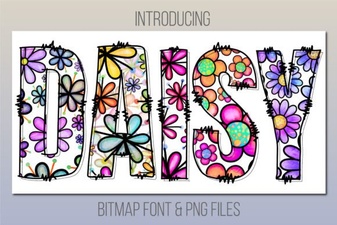 Download Daisy Font for Your Creative Designs
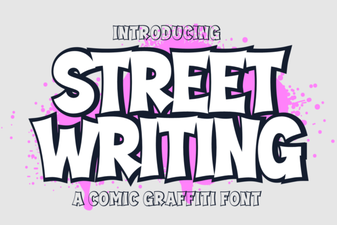 Urban Street Writing Fonts for Creative Projects
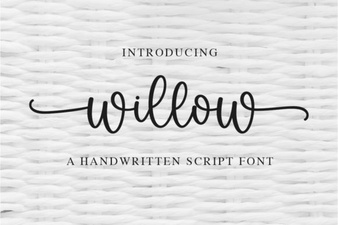 Willow Font: Design and Download Guide
 Battle Army Fonts: Design Assets & Creative Stencil Ideas
 Hello Fonts: Design Resources & Project Ideas
 Nebulan Star: a Font for Creative Design Projects